What Is Defensive Security? A Complete Beginner's Guide (2026)
Defensive security is about building strong barriers, watching for suspicious actions, and stopping active threats before they cause damage. This guide takes you from the fundamentals to prevention, detection, response, SIEM, firewalls, patch management, user training, and a practical learning roadmap.
What is defensive security?
Defensive security is the practice of protecting computer systems, networks, and data by blocking and responding to cyber attacks.
Often called "blue teaming," defensive security focuses on building strong barriers, watching for suspicious actions, and stopping active threats before they cause damage.
Imagine a bank with security guards, cameras, alarms, and secure vaults. The guards watch for suspicious behavior, the cameras record everything, the alarms trigger when something is wrong, and the vaults protect the most valuable assets. Defensive security works the same way — but for digital systems.
Defensive security professionals are the guardians of an organization's digital assets. They don't just wait for attacks to happen; they actively monitor, hunt for threats, and continuously improve security controls.
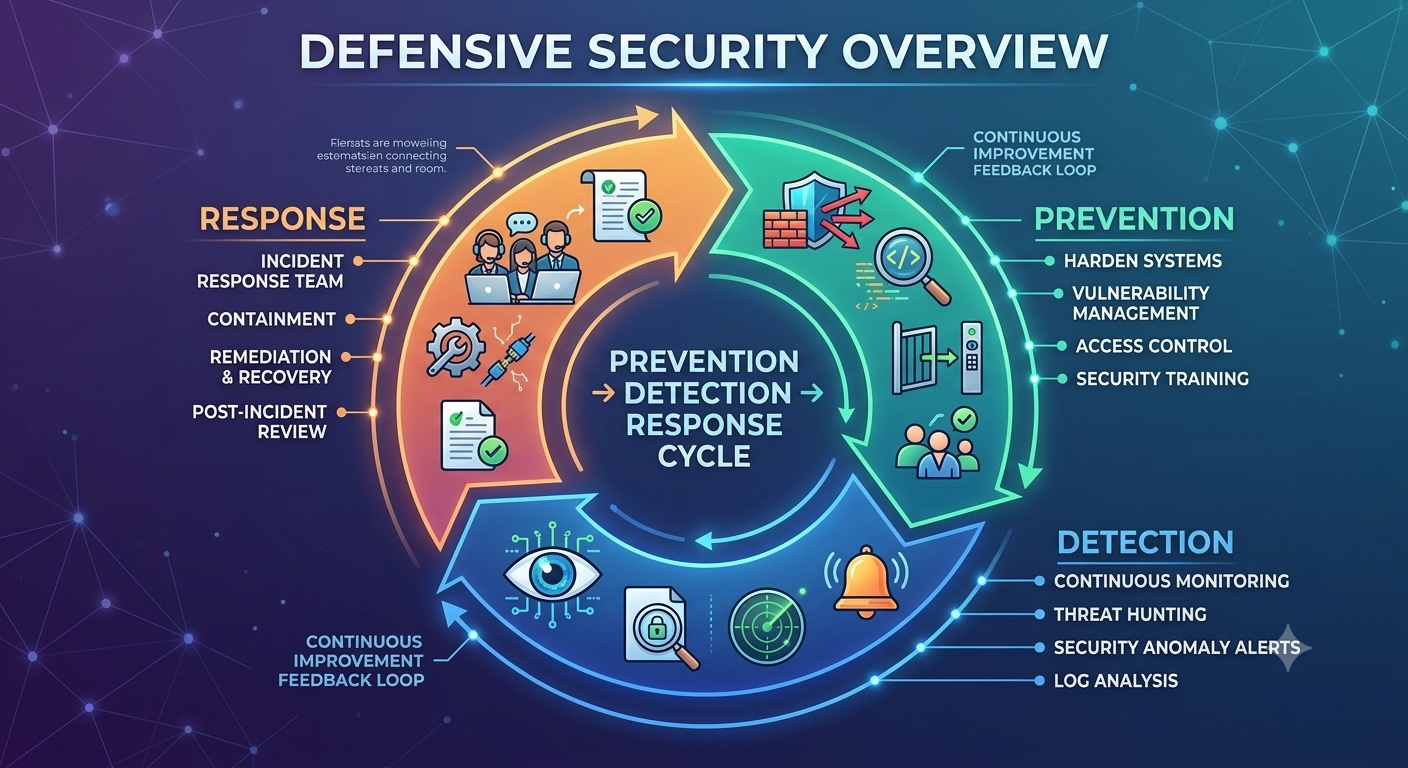
Defensive Security Overview
File: images/defensive-security-overview.png — shows prevention → detection → response cycle
Why is defensive security important?
Cyber attacks are increasing in frequency, sophistication, and impact. Organizations face threats from criminal groups, state-sponsored actors, hacktivists, and insider threats.
A successful attack can result in:
- Stolen customer data and intellectual property
- Financial losses from theft and business disruption
- Damage to brand reputation and customer trust
- Legal and regulatory penalties
- Operational downtime and recovery costs
Defensive security provides the controls, processes, and people needed to prevent these outcomes. It transforms security from a reactive expense into a proactive business enabler.
Protect critical assets
Safeguard sensitive data, intellectual property, customer information, and essential systems.
Detect threats early
Identify suspicious activity before it becomes a full-blown breach or major incident.
Respond effectively
Contain, investigate, and recover from security incidents with minimal business impact.
Core goals of defensive security
Defensive security professionals work toward three primary objectives: prevention, detection, and response.
Prevent
Stop attacks before they start by locking down systems, fixing vulnerabilities, and implementing security controls.
Examples: Firewalls, patch management, access controls, encryption, secure configurations.
Detect
Find strange activity or unauthorized users quickly through monitoring, alerts, and threat hunting.
Examples: SIEM, intrusion detection systems, log analysis, security monitoring, anomaly detection.
Respond
Contain active breaches, investigate the root cause, and fix weak spots right away.
Examples: Incident response plans, containment procedures, forensic analysis, recovery processes.
Defensive security vs offensive security
Defensive and offensive security are complementary disciplines. One without the other leaves gaps in an organization's security posture.
| Area | Defensive Security | Offensive Security |
|---|---|---|
| Primary question | How can we prevent, detect, and respond to attacks? | How could an attacker compromise this environment? |
| Approach | Protective, monitoring-focused, and response-oriented | Proactive and adversary-focused |
| Examples | SOC monitoring, SIEM, firewalls, EDR, incident response | Pen testing, red teaming, vulnerability validation |
| Common name | Blue Team | Red Team |
| Desired outcome | Reduce successful attacks and limit their impact | Discover and demonstrate weaknesses safely |
Common defensive security measures
Defensive security uses a variety of controls to protect systems. These can be categorized as technical, administrative, and physical controls.
Patch Management
Updating software to fix known security holes and vulnerabilities before attackers can exploit them.
Firewalls
Controlling what network traffic goes in and out of a network based on security rules and policies.
Monitoring Tools (SIEM)
Using systems like SIEM to analyze logs and detect threats in real time.
User Training
Teaching employees how to spot phishing, social engineering, and other common cyber threats.
Access Controls
Ensuring only authorized users can access sensitive systems and data through authentication and authorization.
Encryption
Protecting data by converting it into a coded form that can only be read with the correct key.
Patch management
Patch management is the process of identifying, acquiring, testing, and installing software updates to fix known vulnerabilities.
Software vendors regularly release patches to address security flaws, fix bugs, and improve performance. Attackers often exploit known vulnerabilities that have been publicly disclosed but not yet patched.
Why patch management matters
- Prevents attackers from exploiting known vulnerabilities
- Reduces the organization's attack surface
- Complies with regulatory requirements and security standards
- Protects against ransomware and other malware campaigns
Best practices for patch management
- Maintain an inventory of all software and systems
- Prioritize patches based on criticality and exploitability
- Test patches in a non-production environment first
- Establish a regular patching schedule
- Monitor for new vulnerabilities and patch releases
- Document and track patch deployments
Firewalls
A firewall is a network security device that monitors and controls incoming and outgoing network traffic based on predetermined security rules.
Firewalls act as a barrier between trusted internal networks and untrusted external networks, such as the internet. They examine each packet of data and decide whether to allow or block it.
Types of firewalls
- Network firewalls: Protect an entire network, typically placed at the network perimeter
- Host-based firewalls: Installed on individual devices to protect that specific system
- Web application firewalls (WAF): Protect web applications from common attacks like SQL injection and XSS
- Next-generation firewalls (NGFW): Combine traditional firewall functions with advanced threat detection and application awareness
For a deeper dive, read our Firewall Basics guide.
SIEM & security monitoring
Security Information and Event Management (SIEM) systems collect, analyze, and correlate security data from across an organization's infrastructure.
SIEM platforms aggregate logs, alerts, and events from firewalls, servers, applications, endpoints, and other security tools. They use correlation rules and analytics to identify suspicious patterns that might indicate an attack.
What SIEM does
- Collects and normalizes log data from multiple sources
- Analyzes events in real time for threat detection
- Correlates seemingly unrelated events to identify attack patterns
- Generates alerts for security analysts to investigate
- Provides dashboards and reporting for security operations
Key SIEM capabilities
- Log management: Centralized log storage and retention
- Threat detection: Identify known and unknown threats
- Incident investigation: Analyze events to understand attack scope
- Compliance reporting: Demonstrate compliance with regulations
- Automated response: Trigger actions based on defined rules
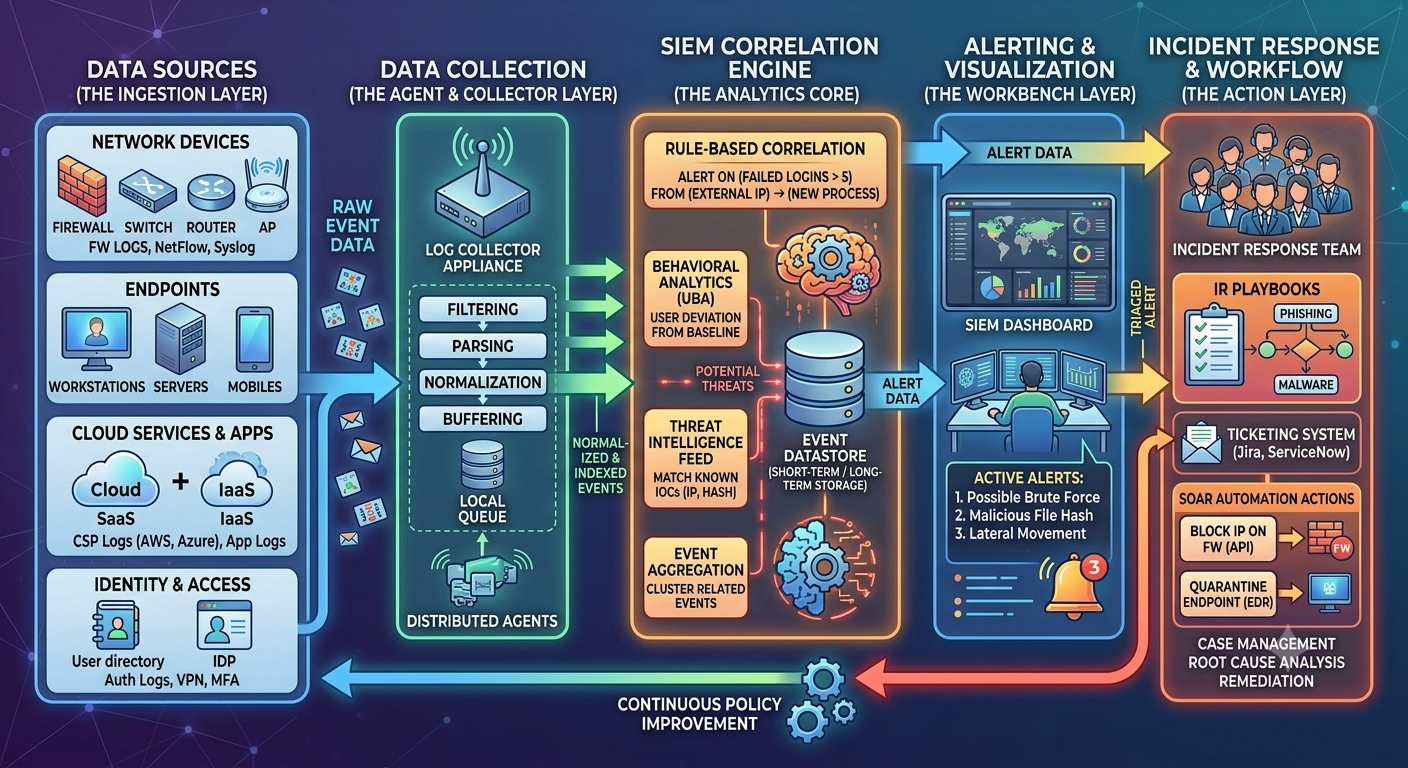
SIEM Architecture Overview
File: images/siem-architecture.png — shows data sources → log collection → correlation → alerting → response
Learn more about security monitoring and threat detection with our Wireshark tutorial for network analysis fundamentals.
User training & security awareness
Security awareness training teaches employees how to recognize and respond to cyber threats like phishing, social engineering, and other common attacks.
Humans are often the weakest link in security. Attackers frequently target people through phishing emails, fake websites, phone calls, and other social engineering techniques. A well-trained workforce becomes a strong defense layer.
Key training topics
- Phishing and email safety
- Strong password practices
- Social engineering awareness
- Secure remote work practices
- Reporting security incidents
- Data protection and privacy
For more on password security, check out our 10 Common Password Mistakes guide.
Incident response
Incident response is the process of preparing for, detecting, containing, investigating, and recovering from security incidents.
Even with strong prevention controls, incidents can still occur. An incident response plan ensures the organization can respond quickly and effectively to minimize damage.
The incident response lifecycle
Preparation
Develop incident response plans, train teams, and ensure tools are ready for incident handling.
Detection & analysis
Identify potential incidents through monitoring, alerts, and user reports.
Containment
Isolate affected systems to prevent the incident from spreading or causing further damage.
Eradication
Remove the threat from affected systems and address the root cause.
Recovery
Restore systems to normal operation and monitor for any remaining issues.
Lessons learned
Review the incident, identify improvements, and update processes accordingly.
Defense in depth
Defense in depth is a security strategy that uses multiple layers of protection. If one control fails, another layer still provides protection.
No single security control is perfect. Firewalls can be misconfigured. Patches can be delayed. Users can make mistakes. Defense in depth ensures that a failure in one area doesn't compromise the entire system.
Physical layer
Secure facilities, access badges, surveillance cameras, and locked server rooms.
Network layer
Firewalls, network segmentation, VPNs, intrusion detection, and network monitoring.
Endpoint layer
Antivirus, EDR, host firewalls, device encryption, and software updates.
Application layer
Secure coding, application firewalls, vulnerability testing, and input validation.
Data layer
Encryption, access controls, data classification, backups, and data loss prevention.
Human layer
Security awareness training, phishing simulations, and security policies.
For more on layered security, read our Cybersecurity Fundamentals guide.
Skills needed for defensive security
Defensive security is a diverse field. You don't need to master everything immediately, but strong fundamentals make advanced work much easier.
Networking
Understand TCP/IP, ports, DNS, HTTP, routing, firewalls, VPNs, and network protocols.
Operating systems
Understand Linux and Windows users, permissions, services, filesystems, authentication, and logs.
Security fundamentals
Understand vulnerabilities, threats, risk, authentication, authorization, encryption, and security controls.
Certifications
- Security+: A broad foundational security certification.
- CySA+: Focuses on threat detection and security analytics.
- SOC Analyst certifications: For security operations center roles.
- GIAC certifications: Hands-on defensive security certifications.
How to start learning defensive security
The strongest defensive security learners build fundamentals before jumping into advanced tools. Networking concepts, operating systems, and security principles remain valuable regardless of technology changes.
Learn networking fundamentals
Study IP addresses, subnetting, TCP/UDP, ports, DNS, HTTP, routing, and firewalls.
Learn Linux and Windows
Understand users, permissions, processes, services, logs, and command-line tools.
Learn security fundamentals
Understand vulnerabilities, threats, risk, authentication, authorization, encryption, and the CIA Triad.
Learn monitoring and logging
Understand how logs work, what to monitor, and how to analyze security events.
Learn threat detection
Study how to identify suspicious activity, create detection rules, and investigate alerts.
Learn incident response
Understand how to contain, investigate, and recover from security incidents.
Build a home lab
Set up virtual machines, security tools, and monitoring systems to practice safely.
Explore specialization
Choose SOC analysis, threat hunting, cloud security, incident response, or security engineering.
Ready to continue learning?
Explore more cybersecurity guides and tutorials from PasswordGeeks.
Defensive Security FAQ
What is defensive security?
Defensive security is the practice of protecting computer systems, networks, and data by blocking and responding to cyber attacks. Often called "blue teaming," this approach focuses on building strong barriers, watching for suspicious actions, and stopping active threats before they cause damage.
What are the core goals of defensive security?
The core goals are prevention (stop attacks before they start), detection (find strange activity quickly), and response (contain active breaches and fix weak spots right away).
What are common defensive security measures?
Common measures include patch management, firewalls, monitoring tools like SIEM, and user training to spot phishing and social engineering attacks.
What is the difference between defensive and offensive security?
Defensive security focuses on preventing, detecting, and responding to attacks. Offensive security simulates attacks to find weaknesses. Both work together for comprehensive protection.
What is a SIEM?
SIEM stands for Security Information and Event Management. It's a system that collects, analyzes, and correlates security data from across an organization's infrastructure to detect and investigate threats.
Do I need programming to start defensive security?
No. You can start with networking, operating systems, security concepts, and basic monitoring tools. Programming becomes increasingly useful as you progress into automation and advanced analysis.
What is the difference between a firewall and a SIEM?
A firewall controls network traffic based on rules, blocking or allowing connections. A SIEM collects and analyzes security data from multiple sources (including firewalls) to detect threats and investigate incidents.
What is incident response?
Incident response is the process of preparing for, detecting, containing, investigating, and recovering from security incidents. It ensures organizations can respond quickly and effectively to minimize damage.
Test Your Understanding
Answer all 5 questions below. If you get one wrong, don't worry — you'll get another chance to pick the correct answer. This chapter is only marked complete when all 5 answers are correct.
What are the three core goals of defensive security?
What is the main purpose of a SIEM system?
Which activity is part of the “Detect” goal in defensive security?
What does “defense in depth” mean in defensive security?
What is incident response primarily concerned with?
Chapter Complete
All 5 questions solved. This chapter is now marked complete in Module 1.