Dashlane Review 2026: Is It Safe, Worth It & Good?
A detailed look at Dashlane's security architecture, encryption, zero-knowledge design, passkeys, password health tools, privacy features, usability, and overall value for everyday users.
Users who want a polished password manager with strong security architecture, excellent password-health tools, passkey support, and a simple everyday experience.
What Is Dashlane?
Dashlane is a password manager designed to securely store passwords, passkeys, personal information, and other sensitive credentials while making everyday account management easier.
The service provides features such as password generation, autofill, password health monitoring, dark web monitoring, secure credential storage, and passkey management.
Dashlane is available for both individual users and organizations, with the latter receiving additional administrative and credential-security capabilities.
For consumers, the central idea is straightforward: instead of remembering dozens of passwords, Dashlane stores encrypted credentials and helps users create stronger and more unique passwords for individual accounts.
Why Password Managers Matter
Password reuse remains one of the most practical problems in online security. A person may have dozens of accounts but remember only a handful of passwords, which can lead to the same password being reused across multiple websites.
That creates a chain reaction when one service suffers a credential breach. Attackers can attempt leaked usernames and passwords against other services in a technique commonly known as credential stuffing.
A password manager changes that model by generating and storing unique credentials for each account.
The user only needs to protect the password manager itself, while the application handles the individual credentials.
How We Reviewed Dashlane
A useful password-manager review should look beyond the feature list. For this guide, the main areas considered are security architecture, privacy, day-to-day usability, autofill, password and passkey management, security monitoring, cross-device support, plan value, and how easy the product is to understand for a normal user.
Dashlane scorecard
| Category | Our Score |
|---|---|
| Security architecture | 4.9 / 5 |
| Privacy | 4.7 / 5 |
| Ease of use | 4.8 / 5 |
| Features | 4.8 / 5 |
| Password health & monitoring | 4.9 / 5 |
| Value | 4.5 / 5 |
| Overall | 4.8 / 5 |
The 4.8/5 overall rating reflects Dashlane's strong security model, polished everyday workflow, Password Health tools, passkey support, monitoring features, and broad cross-device support. The main trade-off is that users looking for a permanently free password manager now have stronger alternatives elsewhere.
Key Features
- Zero-knowledge security architecture
- Local AES-256-CBC-HMAC vault encryption
- Password generator
- Password Health monitoring
- Dark Web Monitoring
- Master Password alerts
- Passkey management
- Multi-factor authentication
- Secure credential sharing
- Autofill and autosave
- Secure notes and personal information storage
- Biometric authentication on supported devices
- Cross-platform access
Security
Security is arguably the most important part of evaluating any password manager because the application is ultimately protecting credentials that could provide access to a user's most important online accounts.
Dashlane uses a zero-knowledge architecture. According to Dashlane's current security documentation, vault data is encrypted locally before it leaves the user's device and can only be decrypted on authorized devices.
Dashlane currently documents AES-256-CBC-HMAC for vault encryption, providing both confidentiality and integrity protection.
Another important part of the architecture is the separation between vault encryption and authentication. Dashlane uses a unique device key to establish device trust rather than treating the same secret as both an encryption and authentication mechanism.
Dashlane also documents Argon2d as part of its key-derivation system, providing additional resistance against password guessing attacks.
This layered approach is important. Password-manager security is not determined by the encryption algorithm alone. The security of the application also depends on key management, authentication, device trust, recovery mechanisms, and how sensitive information is handled during normal operation.
Dashlane's Zero-Knowledge Architecture
Zero knowledge is one of the most important concepts to understand when evaluating Dashlane.
In simple terms, the architecture is designed so that Dashlane cannot read the contents of a user's vault. The sensitive information is encrypted before being stored, and the decryption process takes place on an authorized device.
This means Dashlane's servers can store encrypted vault data for synchronization and backup without possessing a readable copy of the user's passwords.
Dashlane explicitly states that its employees cannot see customer logins or personal information because of this zero-knowledge design.
From a security perspective, this is a major distinction between simply storing passwords in an ordinary cloud database and designing the service so that the provider itself cannot access the plaintext vault.
Confidential Computing and AWS Nitro Enclaves
One of the more technically interesting parts of Dashlane's current architecture is its use of confidential computing.
Dashlane states that certain cloud-side cryptographic operations are protected using AWS Nitro Enclaves. These hardware-isolated environments are designed to keep sensitive operations isolated from the underlying host infrastructure.
This extends the zero-knowledge philosophy beyond simply encrypting stored data. The objective is to reduce the amount of sensitive information exposed even while security operations are being performed in the cloud.
For technically minded users, this is one of the more interesting aspects of Dashlane's current security model.
Passkeys
Passkeys are gradually changing how users authenticate to online services. Instead of typing a password, a passkey uses public-key cryptography to authenticate the user.
Dashlane supports passkeys and has developed additional security protections around their management. Dashlane says new passkeys created through its service use confidential computing protections for the private key material.
The important advantage of passkeys is their resistance to traditional phishing attacks. Unlike passwords, there is no secret password for a phishing website to simply collect and reuse.
Dashlane's support for passkeys therefore makes the service relevant not only for traditional password management but also for the transition toward passwordless authentication.
Password Health
A password manager is most useful when it does more than simply store credentials.
Dashlane's Password Health functionality helps users identify weak and reused passwords so they can prioritize accounts that need attention.
This is particularly useful for people who are migrating from years of manually managed passwords. Instead of trying to remember which accounts need stronger credentials, the password manager can provide a centralized view of credential hygiene.
Dashlane also provides a password generator, allowing users to create stronger credentials instead of inventing passwords themselves.
Dark Web Monitoring and Security Alerts
Dashlane also provides monitoring features intended to alert users when account-related information may have been exposed.
Its security tools include Dark Web Monitoring as well as Master Password alerts. Dashlane says Master Password alerts can warn users if their Master Password is considered weak or if a matching password has appeared on the dark web.
These features are valuable because password security does not end when a strong password has been generated. Credentials can still become exposed through breaches at third-party services.
The important distinction is that monitoring tools do not prevent the original breach. Their value is in helping users identify potential exposure and take corrective action sooner.
Privacy
Dashlane's privacy model is closely connected to its zero-knowledge architecture.
The company states that encrypted vault information may be stored or backed up on its servers for synchronization, but that the data remains unreadable to Dashlane.
At the same time, zero knowledge does not mean that a company collects absolutely no information. Dashlane explains that limited account information such as an email address and billing information for paying customers is still required for the service to operate.
This is an important distinction when evaluating privacy claims. A zero-knowledge password vault protects the contents of the vault; it does not mean that the provider has no operational information about the account.
Ease of Use
Dashlane has historically focused heavily on making password management accessible to ordinary users, and that remains one of its strongest characteristics.
The basic workflow is straightforward: save a credential, return to the website later, and allow Dashlane to autofill the login information.
The same philosophy applies to password generation. Rather than manually creating a new password every time an account requires one, Dashlane can generate a strong credential and store it automatically.
Biometric unlocking is also supported on compatible devices, which can reduce the friction of accessing the vault while maintaining an additional authentication layer.
For users who want strong security without spending a lot of time manually managing credentials, this balance between security and convenience is one of Dashlane's biggest advantages.
Phishing Resistance
Password managers can also play an important role in reducing the success of phishing attacks.
A password manager can recognize the domain for which a credential was originally saved. This provides an important security advantage over manually copying and pasting a password into any website that happens to request it.
Dashlane's current security documentation describes additional phishing-resistance mechanisms, including passkeys, FIDO2 security keys, domain-level protections, and an in-browser AI Phishing Detection engine.
Passkeys are particularly interesting because their origin-bound design makes traditional credential phishing significantly more difficult.
Dashlane Web & Mobile App Interface
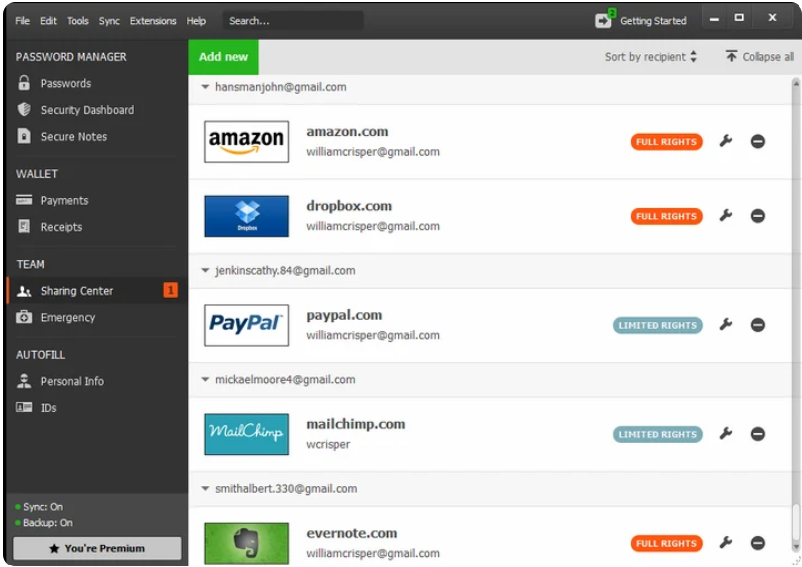
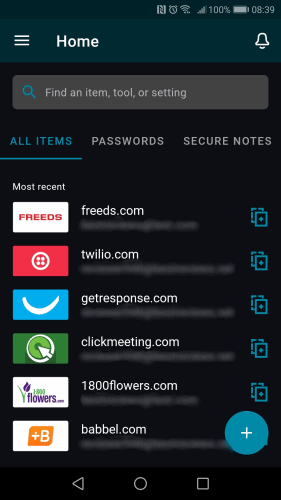
A password manager is something you interact with every day, so the interface matters almost as much as the underlying feature list. Dashlane's browser-based experience centers on the web app and browser extension, while its Android and iPhone apps provide access to the same core vault data on mobile devices.
The screenshots below give readers a practical look at the two interfaces. The web screenshot is best used to show the vault, Password Health, or another major dashboard. The mobile screenshot should show the vault or a login item clearly enough that readers can understand the app layout.
Performance and Everyday Experience
For a password manager, performance is less about raw benchmark numbers and more about whether the application stays out of the user's way.
Dashlane's primary everyday tasks — saving credentials, generating passwords, autofilling forms, and accessing stored information — are designed to happen with minimal manual interaction.
The actual experience can vary depending on the operating system, browser, device performance, network conditions, and number of stored credentials.
For users managing many online accounts, however, the convenience of having one synchronized password vault can easily outweigh the small amount of overhead introduced by using a dedicated password manager.
Security vs. Convenience
One of the strongest aspects of Dashlane is that its security features do not require users to become cybersecurity experts.
A technically advanced user can take advantage of features such as passkeys, MFA, security keys, password health monitoring, and the underlying zero-knowledge architecture.
At the same time, an ordinary user can simply install the application, generate strong passwords, and use autofill.
That combination is important because security controls are only useful when people actually use them.
Dashlane Pricing in 2026
Dashlane's current personal lineup is simpler than it was in previous years. For new personal customers, the main paid choices are Dashlane Premium for one person and Friends & Family for a group of up to 10 members.
| Plan | What It Is For | Key Points |
|---|---|---|
| Premium | Individual users | Unlimited passwords and devices, passkeys, secure sharing, Dark Web Monitoring, Password Health, password generator, autofill, and VPN access. |
| Friends & Family | Families or small groups | Up to 10 accounts under one subscription. The plan manager receives the Premium benefits; Dashlane notes that VPN access is limited to the plan manager. |
Dashlane states that it no longer sells its older Free, Advanced, Essentials, and Premium Plus plans to new customers. New users can currently start with a 14-day Premium trial before choosing a paid personal plan.
Dashlane also says personal plans are sold as annual subscriptions rather than monthly subscriptions. Because regional pricing, taxes, discounts, and app-store pricing can vary, we recommend checking Dashlane's official pricing page for the exact amount shown in your country.
Is Dashlane worth the price?
Dashlane makes the most sense when you will actually use its broader security toolkit — Password Health, Dark Web Monitoring, passkeys, cross-device syncing, secure sharing, phishing and scam protection features, and the included VPN on eligible Premium access. If you only need basic password storage and want a permanently free plan, Bitwarden or another alternative may offer better value.
Getting Started With Dashlane
If you are moving from a browser or another password manager, the safest approach is to migrate in stages rather than immediately deleting your old vault.
- Create your Dashlane account and install the browser extension on your primary computer.
- Import your existing credentials using Dashlane's supported import process for your old browser or password manager.
- Check several important accounts manually to confirm usernames, URLs, notes, and custom fields imported correctly.
- Enable mobile access and autofill on Android or iPhone so the same vault is available when signing into apps.
- Review Password Health and start replacing reused, weak, or compromised passwords with unique credentials.
- Securely delete any unencrypted export file after you have confirmed that the migration was successful.
This last step matters because CSV exports from password managers are often readable files containing your credentials. Leaving one in Downloads, cloud storage, or a backup folder can undermine the protection you gain from using an encrypted vault.
Pros & Cons
Pros
- Strong zero-knowledge security architecture
- AES-256-CBC-HMAC vault encryption
- Separate device authentication architecture
- Argon2-based key derivation
- Passkey support
- Password Health monitoring
- Dark Web Monitoring
- Master Password alerts
- MFA and security-key support
- Strong phishing-resistance features
- Polished and user-friendly experience
Cons
- Some advanced features depend on the selected plan
- Pricing and plan structures can change
- Users looking for only basic password storage may not need the full feature set
- Cloud synchronization is part of the service model
- Advanced security architecture can be more than a basic user actually requires
Who Should Use Dashlane?
Dashlane is particularly well suited to users who want a password manager that combines strong security with a polished and relatively simple user experience.
It is also a strong candidate for users who want to move toward passwordless authentication. Passkey support means Dashlane can manage credentials based on modern authentication standards rather than relying exclusively on traditional passwords.
Users who regularly create accounts, manage many passwords, or want automated monitoring of their credential security are likely to benefit most from the platform.
It can also be particularly interesting for technically minded users because Dashlane publishes unusually detailed information about its security architecture and threat model.
Dashlane vs. Bitwarden
Dashlane and Bitwarden take somewhat different approaches. Dashlane emphasizes a polished consumer experience, integrated monitoring, Password Health, passkeys, scam/phishing protection, and extra services such as VPN access with Premium. Bitwarden is especially attractive for users who prioritize open-source software and a strong free offering.
If price and open-source transparency are your priorities, Bitwarden is difficult to ignore. If you prefer an integrated premium security suite with a highly guided interface, Dashlane may be the better fit. Read our Bitwarden review for a deeper look.
Dashlane vs. 1Password
Both are polished premium password managers. 1Password stands out for its Secret Key account-security model, Travel Mode, multiple-vault organization, and mature family/business workflows. Dashlane stands out for Password Health, Dark Web Monitoring, its newer scam/phishing protection features, and the VPN included with eligible Premium access.
The better choice depends on which workflow you prefer rather than on a single feature. See our 1Password review for the full comparison context.
Who Should Avoid Dashlane?
Dashlane may not be the best choice if your main requirement is a permanently free password manager, if you strongly prefer an open-source product, or if you only want basic local password storage without a broader cloud-based security service.
It can also be more product than some users need. Someone who only wants to store a small number of logins may not get enough value from advanced monitoring, cross-device features, passkeys, sharing, and the additional security tools included with a paid plan.
Dashlane Alternatives
Dashlane is a strong password manager, but it is not the only option worth considering.
Bitwarden is particularly attractive to users who prioritize open-source software and a strong free offering.
1Password is known for its polished interface and broad set of features, making it a strong choice for users willing to pay for a premium password-management experience.
Proton Pass is another interesting alternative, particularly for users who already use other privacy-focused Proton services.
NordPass is also worth considering for users who want a security-focused password manager with a modern interface and additional monitoring features.
The best choice ultimately depends on your priorities: security architecture, privacy, usability, features, cross-device support, ecosystem integration, or price.
Frequently Asked Questions
Is Dashlane safe?
Dashlane uses a zero-knowledge architecture in which vault data is encrypted locally and decrypted only on authorized devices. Its current security documentation describes AES-256-CBC-HMAC encryption, device authentication controls, and additional security layers.
What encryption does Dashlane use?
Dashlane currently documents AES-256-CBC-HMAC for vault encryption. It also uses Argon2d as part of its key-derivation architecture.
Does Dashlane use zero-knowledge architecture?
Yes. Dashlane states that its vault data is encrypted before leaving the user's device and that Dashlane cannot read the contents of customer vaults.
Does Dashlane support passkeys?
Yes. Dashlane supports passkeys and has implemented additional security protections around their storage and use, including confidential-computing protections.
Does Dashlane support multi-factor authentication?
Yes. Dashlane supports MFA and also documents support for FIDO2 security keys and other phishing-resistant authentication mechanisms.
Does Dashlane monitor the dark web?
Dashlane provides Dark Web Monitoring and additional security alerts designed to help users identify potential credential exposure.
Can Dashlane employees see my passwords?
Dashlane says no. Its zero-knowledge architecture is designed so that employees cannot access the contents of a user's vault.
Is Dashlane better than Bitwarden?
There is no universal winner. Dashlane is particularly appealing for users who prioritize a polished experience, monitoring features, passkeys, and a layered security architecture. Bitwarden can be more attractive to users who prioritize open-source transparency and a strong free plan.
Is Dashlane worth paying for?
For users who will actively use its password-health, monitoring, synchronization, and additional security features, a paid plan can provide meaningful value. Users who only need basic password storage may find a simpler or free alternative sufficient.
Final Verdict
Dashlane is a mature password manager with a security architecture that goes considerably deeper than simply encrypting passwords in a cloud database.
Its current zero-knowledge architecture, local AES-256-CBC- HMAC encryption, separate device authentication model, and Argon2-based key derivation provide a strong technical foundation.
The platform also benefits from features that address real-world account security problems: Password Health helps identify weak credentials, Dark Web Monitoring can alert users to potential exposure, and passkeys provide a path toward phishing-resistant passwordless authentication.
What makes Dashlane particularly compelling is the balance between technical security and usability. A security product can have excellent cryptography and still fail if ordinary users find it difficult to use. Dashlane's approach is to hide much of that complexity behind a relatively straightforward interface.
For users looking for a premium password manager with strong security architecture, modern authentication support, and useful credential-health features, Dashlane deserves serious consideration.
Learn More About Dashlane →