1Password Review (2026): The Complete Guide
An in-depth look at 1Password's security architecture, encryption, privacy features, usability, pricing, migration process, and everyday performance — with real screenshots of the web and mobile apps — to help you decide if it is the right password manager for you.
Individuals, families, professionals, and users who want a polished password manager with strong security and advanced account protection.
What Is 1Password?
1Password is a password manager designed to securely store and organize passwords, payment information, secure notes, identities, and other sensitive information inside encrypted vaults.
Instead of remembering a different password for every account, you can use 1Password to generate and store strong, unique credentials while accessing them through browser extensions and dedicated applications.
The service is designed for both individual users and families, with additional options available for teams and business environments, including admin controls, shared vaults, and provisioning tools aimed at larger organizations.
Why Password Managers Matter
Password reuse remains one of the most common weaknesses in personal account security. If the same password is used across several websites, a compromise at one service can potentially put other accounts at risk.
A password manager helps solve this problem by allowing users to generate long, unique credentials for different accounts without having to memorize every password.
The result is a much more practical approach to credential security: one strong master credential protects a vault containing the individual passwords used across your online accounts.
Key Features
- Encrypted password and credential storage across unlimited items in most plans
- Strong password generator with adjustable length, character sets, and passphrase mode
- Browser extensions and autofill for logins, addresses, and payment cards
- Secure notes and digital information storage, including documents and identity records
- Multiple vaults for organizing personal, family, and work items separately
- Cross-platform synchronization across browser, desktop, and mobile
- Passkey support for sites that support FIDO2-based passwordless login
- Travel Mode for temporarily removing selected vault data from devices before crossing borders
- Watchtower — built-in security monitoring that flags weak, reused, or breached passwords
Security
Security is one of 1Password's most important selling points. The service uses strong, industry-standard encryption (AES-256) to protect information stored in the password vault, combined with PBKDF2-based key derivation so that even a stolen vault file is computationally expensive to brute-force.
1Password also uses a distinctive account-security model that combines your account password with an additional 34-character Secret Key. This approach means your data is protected by two independent factors: something you know (your password) and something you have (the Secret Key, stored locally on your trusted devices). An attacker who obtains your password alone still cannot decrypt your vault.
The Secret Key is generated by 1Password itself rather than chosen by the user, and it's combined with your password through a key-derivation process before any encryption key is produced — meaning 1Password's own servers never see enough information to reconstruct your vault contents.
1Password also supports modern authentication methods, including two-factor authentication and passkeys, providing users with additional protection against unauthorized account access. The company has a history of commissioning third-party security audits and runs a public bug bounty program.
Privacy
1Password is designed around the principle that stored vault information should remain protected through encryption rather than being exposed as ordinary readable data on the service's infrastructure.
The company's security architecture is designed so that 1Password's servers do not simply receive a readable copy of your stored passwords. Encryption and account-derived security mechanisms are used to protect the contents of your vault at every stage, from creation to sync to storage.
For privacy-conscious users, this distinction is important: a password manager should not merely store passwords on a server — it should protect them cryptographically throughout the process, which is the model 1Password follows.
Ease of Use
1Password is one of the more polished password managers when it comes to everyday usability. The interface is designed to make common tasks such as saving credentials, generating passwords, filling login forms, and retrieving secure information straightforward.
Browser extensions make it possible to interact with the vault directly from websites, while dedicated applications provide access to stored information across supported devices.
The large number of available features does introduce some additional complexity. Users who only want basic password storage may need time to become familiar with features such as vault organization, security settings, and Travel Mode.
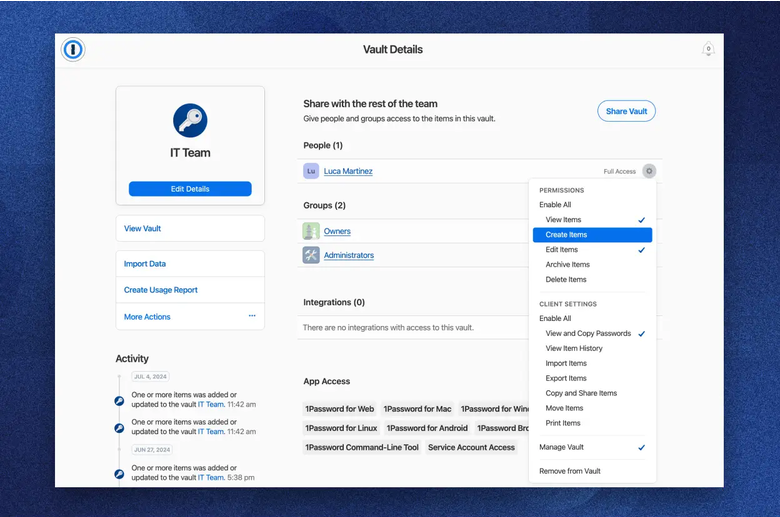
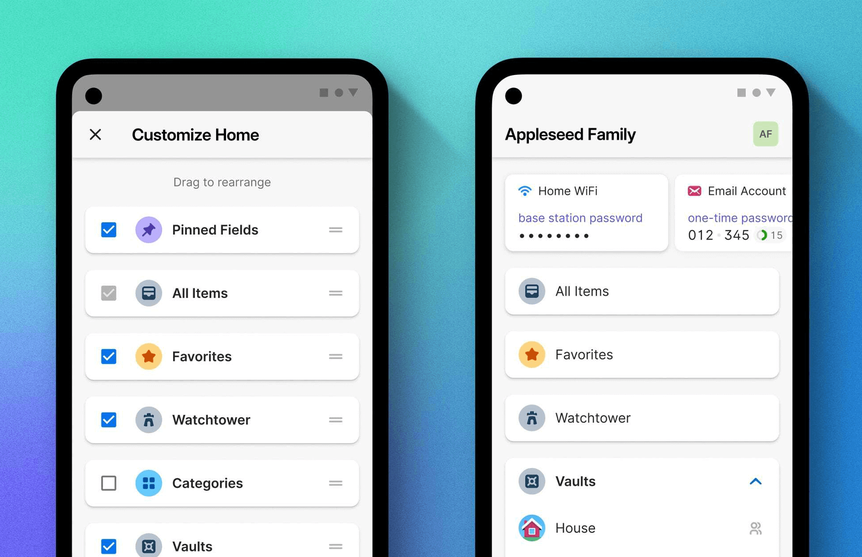
Web & Mobile App Interface
What 1Password actually looks like in daily use — the web/browser vault and the mobile app.
Performance
For everyday password management, 1Password is designed to provide a responsive experience across its applications and browser extensions. Vault changes made on one device typically sync to others within a few seconds under normal network conditions.
The practical performance of a password manager depends on factors such as the device, browser, network connection, and number of stored items. For typical users, however, tasks such as retrieving credentials, autofilling forms, and generating new passwords should fit naturally into normal browsing.
Pricing: Individual, Families & Business
Unlike some password managers that offer a broad permanently free tier, 1Password has traditionally positioned its personal service as a paid product after its introductory trial period.
| Plan | What You Get | Best For |
|---|---|---|
| Individual | Unlimited passwords and devices, Watchtower security monitoring, 1GB document storage | Solo users |
| Families | Everything in Individual for up to 5 members, shared vaults, family organizer controls | Households |
| Teams / Business | Admin console, provisioning, activity logs, shared team vaults, advanced permissions | Companies and teams |
The main consideration is therefore value rather than simply whether the service is free. Users who want a highly polished password manager and are comfortable paying for a dedicated security product may find the feature set worthwhile. Check 1Password's pricing page for current rates, since plan pricing is revised periodically.
Migrating to 1Password
Moving your existing vault into 1Password generally follows the same pattern regardless of which manager you're coming from:
- Export your current vault from your existing password manager, usually as a CSV or 1PUX-compatible file.
- Import into 1Password through the desktop app's Import feature, selecting the matching source.
- Review the imported items for correctly mapped usernames, URLs, and custom fields — imports don't always translate every field perfectly.
- Securely delete the exported file once the import is confirmed; an unencrypted export of your entire vault shouldn't linger on disk.
- Set up your Secret Key and 2FA before relying on 1Password day to day, since these are central to its security model.
Pros & Cons
Pros
- Strong security architecture
- Unique Secret Key adds another layer of protection
- Excellent interface and overall usability
- Powerful password and vault management features
- Passkey support
- Useful features such as Travel Mode and Watchtower
Cons
- No broad permanently free personal plan
- Some advanced features require time to learn
- Paid subscription required for continued personal use
- May offer more features than casual users need
1Password vs. Bitwarden
Bitwarden's biggest advantage is a genuinely generous free plan with unlimited passwords and devices at no cost, plus a fully open-source codebase. 1Password counters with a more polished interface, the Secret Key security model, and stronger built-in tools for families and businesses like Travel Mode and the admin console. If budget is the deciding factor, Bitwarden wins; if you want the most refined day-to-day experience and are willing to pay, 1Password is usually the better fit. Read our full Bitwarden review for more detail.
1Password vs. Proton Pass
Proton Pass leans into privacy specifically — Swiss jurisdiction, built-in email aliases, and a usable free tier — while 1Password leans into polish and business-grade administration. Teams that need granular provisioning and audit logs will find 1Password more mature; privacy-first individuals may prefer Proton Pass's alias system and pricing. See our Proton Pass review for the full picture.
Who Should Use 1Password?
1Password is particularly well suited to people who want strong password security without sacrificing usability. Families can benefit from shared password-management features, while professionals can use separate vaults to organize different categories of sensitive information.
It is also a strong option for users who prefer a polished, feature-rich password manager and are comfortable paying for a premium service rather than choosing a basic free solution.
Alternatives
Bitwarden, Proton Pass, NordPass, Dashlane, and Keeper are among the alternatives worth considering. The right choice depends on what matters most to you — such as free features, interface design, privacy tools, business functionality, cross-platform support, or overall value.
Bitwarden is particularly attractive for users who prioritize open-source transparency and a generous free plan. Proton Pass can be appealing to users already invested in the Proton privacy ecosystem, while NordPass and Dashlane provide their own combinations of usability, security features, and subscription options.
Frequently Asked Questions
Is 1Password safe?
1Password uses strong encryption and a security architecture designed to protect stored vault information. Its additional Secret Key provides another layer of account protection.
Does 1Password support two-factor authentication?
Yes. 1Password supports additional authentication methods that can be used to strengthen account protection beyond the primary account credentials.
Does 1Password support passkeys?
Yes. 1Password supports passkeys, allowing users to manage this newer authentication method alongside traditional password credentials.
Is 1Password free?
1Password's personal service is primarily a paid password manager rather than a permanently free password manager. Availability of trials and specific plan terms can change, so users should check the current offering before subscribing.
Is 1Password good for families?
Yes. Family-oriented features make 1Password suitable for households that want to manage individual and shared credentials while keeping sensitive information organized.
Can I import passwords from another manager?
Yes — 1Password supports importing from most major password managers via CSV or other supported export formats, though it's worth spot-checking custom fields after import.
Is 1Password worth paying for?
For users who value strong security, polished software, cross-platform access, and advanced password-management features, 1Password can justify its subscription cost. Users who primarily want a strong free option may find Bitwarden more attractive.
Final Verdict
1Password is a mature and feature-rich password manager that combines a polished user experience with a security architecture designed for protecting sensitive credentials. Its Secret Key, encrypted vault model, passkey support, and broad collection of management features make it a serious option for users who want more than basic password storage.
Its biggest drawback is straightforward: it is positioned as a premium product rather than a generous permanently free password manager. That makes the decision largely about value. If you are willing to pay for a well-designed password manager with advanced security and organization features, 1Password is one of the strongest options to consider in 2026.
Learn More About 1Password →